
Gembet Login in Singapore

The Gembet login gives an existing user access to the main parts of the platform from one account. After signing in, users can open casino games, move to the sportsbook, check their profile and use account-related tools. GemBet also keeps transaction information and sports bets inside the logged-in area rather than treating casino and betting activity as separate accounts.
Login is available through the GemBet website, so the same account can be reached from a desktop browser or a phone browser. There is also a confirmed Continue with Google option for accounts connected with Google. For users who prefer a normal email-based account, GemBet provides password recovery and optional two-factor authentication.
For people in Singapore, account access is a separate issue from local gambling permission. GemBet has SGD-related content, but Singapore’s Gambling Regulatory Authority states that Singapore Pools is the only operator licensed by GRA to provide remote gambling services in Singapore.
 Claim Your Welcome Bonus Now!

Gembet Games












How to Log In to Gembet
The normal Gembet login Singapore process is quick and easy to follow. Existing users can open the login page, enter their account details and return to the main account area within a few steps. The same login gives access to casino games, sports betting, account settings, transaction history and other profile tools. Google sign-in is also available for linked accounts, while users with extra security enabled may be asked to complete an additional verification step.
Step 1 — Open Gembet
Start from the current GemBet website rather than a login link copied from an unknown message or download page. The official site displays Log In as one of its main account actions.
Step 2 — Select Login
Press Log In to open the account access screen. The same login route also contains the Forgot password? option, which is useful if the normal credentials no longer work.
Step 3 — Enter Your Account Details
Use the credentials connected with the existing account. Users with a Google-linked GemBet profile can instead choose Continue with Google and authenticate through Google.
Step 4 — Confirm Access
An extra check may appear depending on the account security setup. For example, users who have enabled two-factor authentication need to enter a 6-digit code from their authenticator app when logging in.
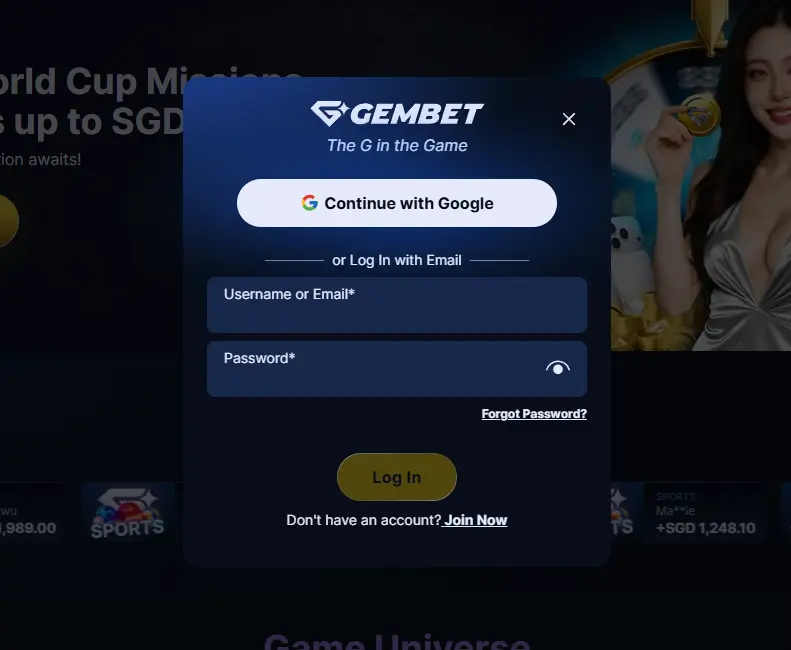
Step 5 — Open Your Account
Once the login succeeds, the user can continue to the casino, sportsbook or account tools. Sports users can open My Bets, while financial and betting records can be checked through Transaction History.
Gembet Login with Google
Google sign-in is not an assumed feature. GemBet added a dedicated Help Center article for it on 9 June 2026, confirming that both registration and login can use a Google account. For an existing Google-linked account, the process is particularly short.
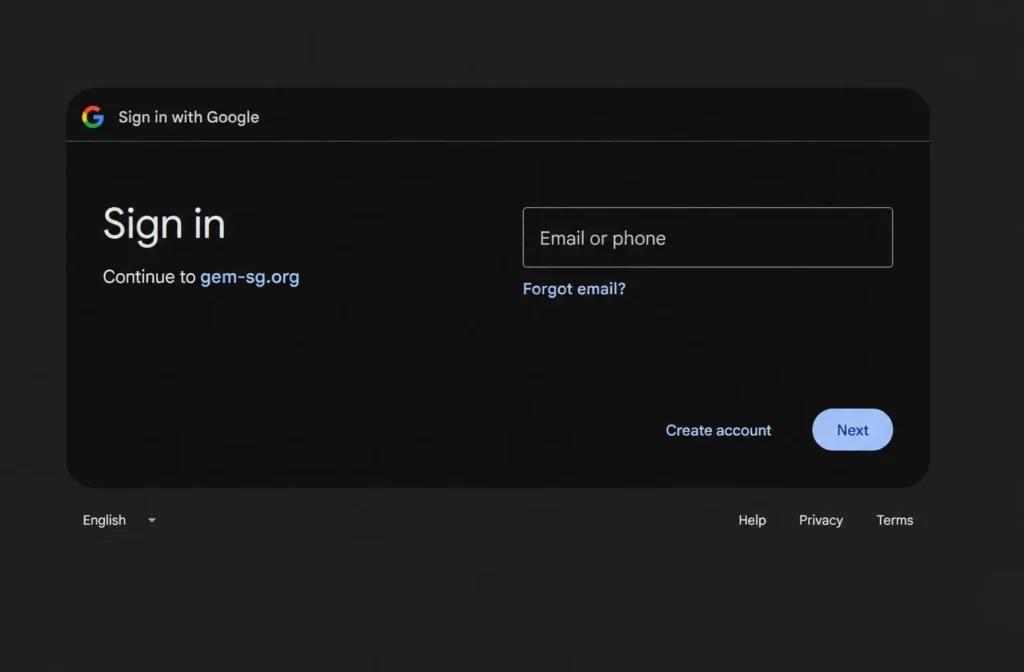
Signing In with Google
Select Continue with Google on the GemBet login screen. Google then handles the authentication step, after which the browser returns to GemBet and opens the linked account.
There is an interesting detail for people who originally created GemBet normally. If an existing GemBet account uses the same email address as the Google account, GemBet says Google sign-in opens that existing profile instead of creating a duplicate.
A user who relies entirely on Google login does not need a separate GemBet password for each normal sign-in. If a password is required later, GemBet says one can be set through password recovery using the linked email address.
Using Google Login on iPhone
Safari handles the process a little differently. GemBet explains that Google authentication on Safari uses a full-page redirect. The user temporarily leaves the GemBet page, signs in with Google and is then sent back to GemBet automatically. This is normal behaviour rather than an indication that the login page has failed. If Safari keeps selecting the wrong Google account, GemBet suggests logging out of Google in Safari first or using an incognito/private session before trying again.
Gembet Login on Mobile
A separate desktop account is not needed just because the user moves to a phone. The GemBet login and account pages are web-based, so the same account structure can be reached through a mobile browser. The important part is to separate mobile access from claims about a native app. The browser login is confirmed. A native application is not required simply to access the account.
Android Login
On Android, open a current browser and go to the verified GemBet site. Select Log In, enter the account credentials or use Google sign-in where appropriate, then complete any extra security step attached to the account.
If 2FA is active, GemBet requires a 6-digit code from the chosen authenticator app. The platform also offers a Trust this device option that can skip future authenticator codes on that particular device, although a code is still required when logging in on other devices. That setting should only be used on a personal phone, not a shared device.
iPhone Login
The basic iPhone flow is similar: open GemBet in Safari, choose Log In and continue with the normal account credentials. Google users should expect the Safari redirect described above. The browser briefly moves to Google for authentication and then returns to GemBet after the login is accepted. This makes the redirect part of the login flow, not a reason to repeatedly reload the page.
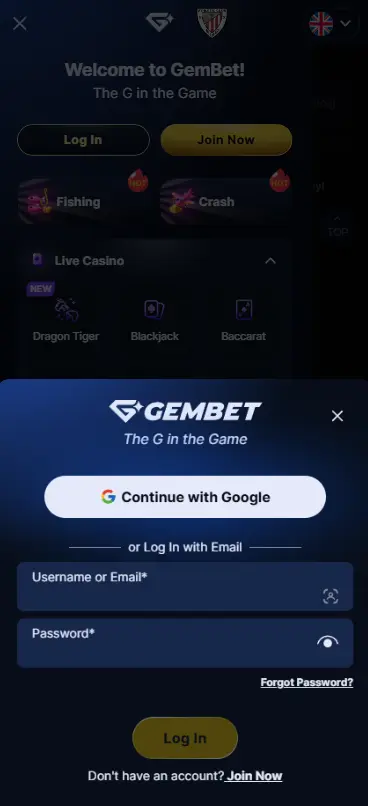
Mobile Browser Access
The browser route is useful because account functions do not depend on installing extra software. GemBet already exposes its login, deposit, casino and sportsbook products through normal web pages. On a smaller screen, menus may be more compact, but the basic account remains the same.
What You Can Access After Login
The account area has more practical use than simply showing a username and balance.
| Area | What Is Available |
|---|---|
| Casino | Access available slots and casino games |
| Live Casino | Open available live dealer content |
| Sportsbook | Browse sports and manage betting activity |
| Account | View profile and account details |
| Transactions | Review deposits, withdrawals and bets |
| My Bets | Check open sports bets and betting activity |
GemBet’s current slot section contains hundreds of games, while its sportsbook has Arena, Live and Prematch areas. The Sports interface also provides direct access to My Bets, bonuses and other betting tools. Account information is fairly detailed. GemBet’s Help Center says the Account Details area can show the username, full name, email, date of birth, registration date, gender and currency, along with address and phone information. The transaction side is useful for checking what actually happened on the account. Transaction History includes deposits, withdrawals and bets, and it can be filtered by date. For sports, My Bets is the quicker route. GemBet says all open bets can be viewed there.
Can’t Log In to Gembet?
Most login problems do not need a complicated fix. Start with the obvious things before changing device settings or creating another account.
Incorrect Username or Password
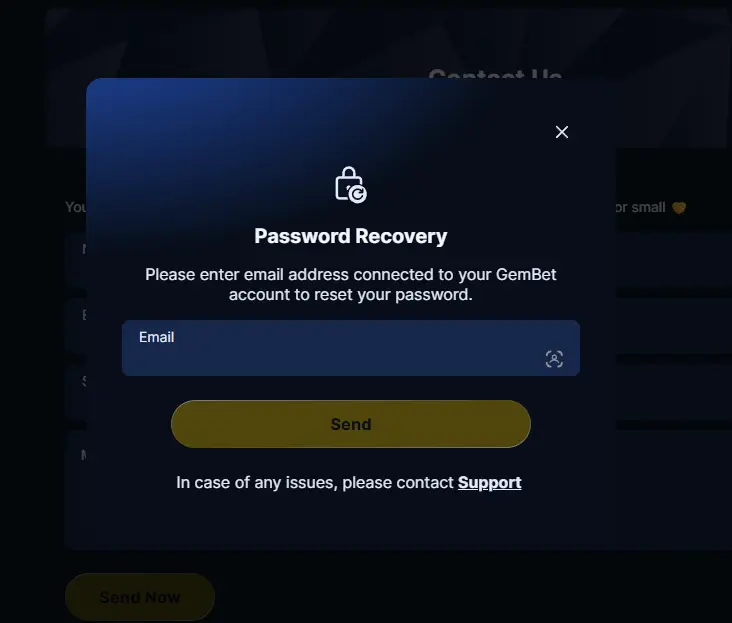
First, check whether the correct account details are being used. A saved browser password can sometimes be older than the current one, so typing the password manually is worth trying once. If the credentials still fail, do not keep testing random variations. GemBet has a normal email-based password recovery process for logged-out users.
Google-linked users should also make sure they are not mixing the two login methods. If the account was normally accessed with Continue with Google, try that route instead of guessing a separate password.
Forgotten Password
GemBet’s recovery process is clear. Open Log In, select Forgot Password?, enter the email address and press Send. GemBet sends a recovery email containing a Reset Password button. The new password is then entered twice to confirm it.
The current password rules require at least 8 characters, at least one number, and both uppercase and lowercase letters. If the email does not appear, check the Spam or Junk folder before requesting another message.
Google Login Not Working
Start by checking which Google account is active in the browser. GemBet says an existing profile connected with the same Google email should open the existing account rather than create another one. On Safari, users who need a different Google account can log out of Google first or try an incognito/private browsing session. Also remember that Safari’s full-page Google redirect is expected. Closing that page halfway through can interrupt the login.
Login Page Not Loading
Do the simple checks first. Confirm the internet connection and reload the page once. If the problem remains, reopen GemBet in another current browser or a private window. Old browser data can also interfere with a sign-in session, so clearing GemBet-related cache or cookies is a reasonable troubleshooting step. Do this only for the affected site if you do not want to clear all saved browser sessions. If the GemBet site itself is temporarily unavailable, changing the password will not fix it. Try again through the verified current access point rather than searching for an unknown mirror.
Keeping Your Gembet Account Secure
A gambling account can contain personal details, payment history and an active balance. Protecting the login therefore matters more than simply choosing a password that is easy to remember.The strongest account-specific feature GemBet currently documents is two-factor authentication. It can be enabled under Profile → Security → Two-Factor Authentication.
During setup, GemBet first sends a 6-digit verification code to the registered email. After that check, a QR code or manual setup key is shown for an authenticator app. GemBet currently recommends Google Authenticator. Once 2FA is active, the authenticator generates the 6-digit login code. That adds another step even if somebody already knows the password. A few habits are worth keeping:
- use a password that is different from your email password;
- never send login credentials or 2FA codes to another person;
- check the site address before typing account details;
- avoid saving passwords on public or shared devices;
- enable 2FA on an account that holds real funds.

GemBet also links to a GemBet Authenticator resource from its site information area. A current GemBet-branded version of that tool describes checks for website URLs, social media pages, agent usernames and phone numbers. This can help when a user is unsure whether an access point or representative is connected with GemBet. Email verification can appear during other account actions too. GemBet says it may be requested when claiming bonuses, making withdrawals or changing account information.
Gembet Login vs Registration
Login and registration both lead to the same GemBet account system, but they are used at different stages. Login is for users who already have an account, while registration creates a new profile and sets the basic account details for future use.
| Feature | Login | Registration |
|---|---|---|
| Who it is for | Existing GemBet users | New users |
| Main purpose | Open an existing account | Create a new GemBet account |
| Details required | Existing credentials or linked Google account | New account details or Google authentication |
| Balance | Opens the current account balance | Starts a new account profile |
| Account history | Shows previous bets and transactions | No previous activity at the start |
| Sports section | Access My Bets and existing betting activity | Creates access for future sports betting |
| Account settings | Opens saved profile and security settings | Sets initial profile information |
| Google option | Can sign in with a linked Google account | Can create an account with Google |
| Currency | Uses the currency already linked to the account | Currency is selected during initial account setup |
| Verification | Extra security checks may appear | Initial account verification may be required |
Google makes the difference slightly less obvious because Continue with Google can be used for both login and registration. If the Google email is already linked to an existing GemBet account, the user is taken back into that profile. A new user can also create an account through Google. For a new Google registration, GemBet asks the user to choose a username and preferred currency after Google authentication. According to the GemBet Help Center, the currency selection is an important step because it is used when the temporary profile becomes the real-money account and cannot simply be changed later.
Gembet Login on Different Devices
The GemBet login works through a browser, so the same account can be opened from different devices without creating a second profile. A user can move from a desktop computer to a phone or tablet and still access the same balance, sports bets, transaction history and account settings. The main difference is the screen size and how much information can be shown at once.
| Device | Access Method | Best Use | Extra Note |
|---|---|---|---|
| Windows PC | Web browser | Full sportsbook and casino browsing | More space for markets, account tools and transaction pages |
| Mac | Web browser | Casino, sportsbook and account management | Works through a standard desktop browser |
| Android | Mobile browser | Quick betting, casino access and account checks | Can also use a browser shortcut on the Home Screen |
| iPhone | Safari or another supported browser | Mobile login, betting and account access | Google login may redirect through Google before returning to GemBet |
| Tablet | Mobile or tablet browser | Casino games, live betting and account tools | Larger screen gives more room than a phone |
| Shared device | Web browser | Temporary account access | Avoid saving passwords and always log out after use |
A useful security detail appears when 2FA is enabled. GemBet allows a user to mark one device as trusted, which can remove the authenticator-code step on later logins from that device. A new device still requires the 6-digit authentication code. That makes device changes possible without weakening the whole account. Users who move between laptop and phone can still access the same transaction records and sports activity. GemBet’s Transaction History keeps deposits, withdrawals and bets in one account record, while My Bets stores the current sports betting activity.
Singapore Account Access and Availability
GemBet has clear Singapore-oriented content. Its Help Center currently includes an entire SGD Bonuses collection and SGD payment guides, including PayNow and bank-transfer material. That does not mean the platform is licensed as a remote gambling operator in Singapore. As of 10 August 2026, Singapore’s Gambling Regulatory Authority states that Singapore Pools is the only operator licensed by GRA to provide remote gambling services.
GRA also says that participation in unlicensed remote gambling by a person in Singapore is an offence. Since 1 January 2025, the Singapore Police Force has also handled measures for blocking access to unlawful remote gambling services, related advertising and payment transactions. So the existence of a Gembet login page, SGD account features or Singapore-specific bonus material should not be read as proof of a Singapore remote gambling licence. Account access and legal permission are separate questions.
Frequently Asked Questions
Open the current GemBet website and select Log In, then use the credentials connected with the existing account. If two-factor authentication is enabled, GemBet will also ask for the 6-digit code from the linked authenticator app before access is completed.
Yes. GemBet officially supports Continue with Google for login. Select the Google option, authenticate with the linked Google account and the browser will return to GemBet. If an existing GemBet account already uses the same email, GemBet says that account is opened rather than creating a duplicate profile.
Yes, the GemBet account can be reached through its web login on a smartphone browser, giving access to the site’s casino, sportsbook and account-related pages. Google sign-in also works on mobile, although Safari uses a full-page Google redirect before returning the user to GemBet.
Select Forgot Password? on the GemBet login screen, enter the registered email address and use the password-reset message sent to that inbox. The new password must contain at least eight characters, one number and both uppercase and lowercase letters.
Check the account details first and make sure the correct login method is being used, especially if the account normally uses Google authentication. A forgotten normal password can be reset by email, while Safari users signing in with Google should expect the page to redirect to Google temporarily and then return to GemBet.
The same account can be reached through GemBet’s web login from different devices, but security checks may differ. If two-factor authentication is active, a new or untrusted device requires the 6-digit authenticator code even when another device has previously been marked as trusted.
GemBet publishes SGD-specific account, payment and bonus content, but this is not proof of local remote gambling licensing. As of 10 August 2026, the Gambling Regulatory Authority states that Singapore Pools is the only operator licensed by GRA to provide remote gambling services in Singapore, and participation in unlicensed remote gambling is an offence.